What is the AI Photo to Sketch converter?
AI Photo to Sketch is a free browser tool from Entertainment Couch that turns a photograph into a realistic pencil, colored-pencil, charcoal, ink, line-art or watercolor-and-pencil drawing. Open-source AI models find the subject and facial features, and a stroke engine draws the image on textured paper. Nothing is uploaded, there is no signup, and downloads have no watermark.
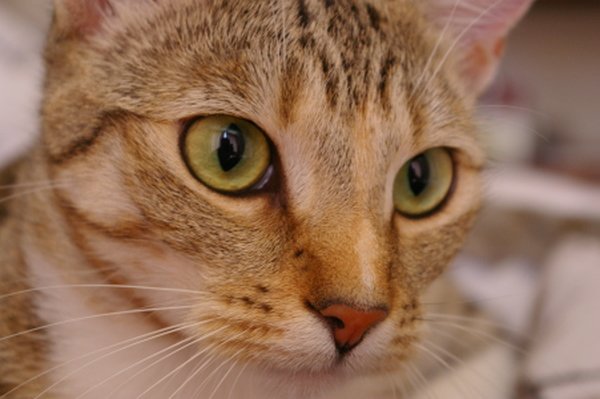
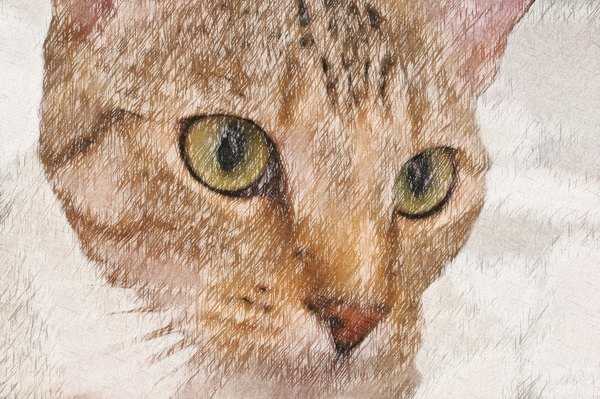
What can you make with it?
- Photo to pencil drawing: a realistic graphite sketch with hatching and soft shading, ideal for portraits and keepsakes.
- Colored pencil sketch from photo: layered colored-pencil strokes over delicate outlines, with white paper showing through.
- Photo to hand-drawn illustration: ink, charcoal, line art or watercolor with pencil for cards, posters and coloring pages.
Because it is an image to sketch tool that runs online for free in your browser, there is nothing to install and you can turn a photo into a drawing on a phone, tablet or computer.
The converter at a glance
| Price | Free, unlimited, no signup, no watermark |
|---|---|
| Styles | Graphite pencil, Colored pencil, Charcoal, Ink pen, Line art, Watercolor + pencil, Quick filter (basic) |
| AI models | U²-Netp salient-object detection (Apache-2.0) and MediaPipe Face Mesh (Apache-2.0), run on your device |
| Upload formats | JPG, PNG, WebP, GIF, BMP, AVIF; HEIC where the browser supports it |
| Downloads | PNG, JPG or WebP up to 4096 px; drawing animation as MP4, WebM or GIF |
| Privacy | All processing happens in the browser; photos are never uploaded |
How do you turn a photo into a pencil sketch?
Six steps, about a minute from photo to downloaded drawing.
Upload a photo
Drop it on the canvas, choose a file or paste it. The photo stays on your device.
Pick a sketch style
Tap Graphite pencil, Colored pencil or another style. Thumbnails show your own photo.
Adjust the details
Set intensity, outlines, shading, paper texture, color and detail, and choose how the background is drawn.
Generate the sketch
Generate HD draws the full-size file at your chosen size.
Preview and compare
Zoom in to check strokes and drag the compare handle against the original.
Download
Save PNG, JPG or WebP, or create a drawing animation video.
Which sketch styles can you make from a photo?
Every style below is drawn from the same analysis of your photo, so the composition never changes, only the drawing medium.
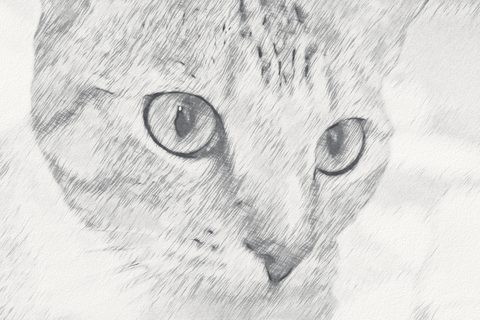
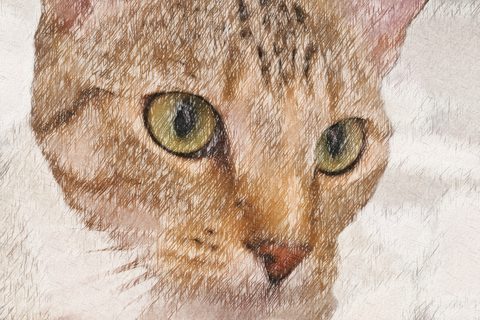
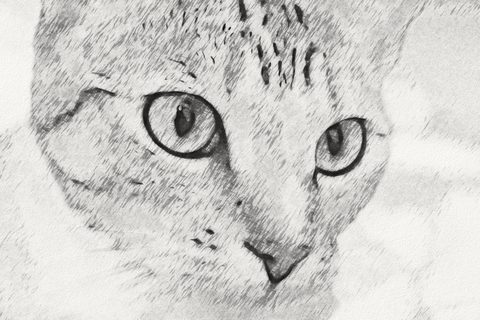
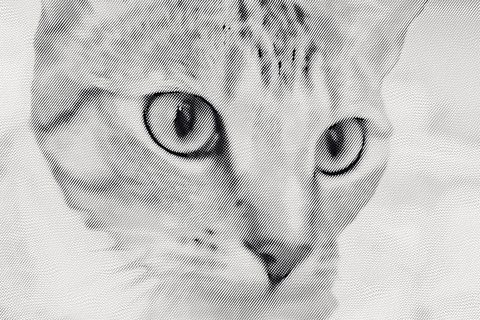
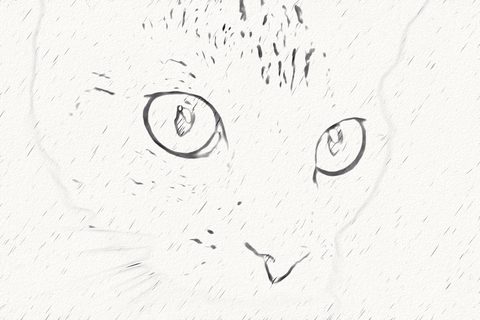
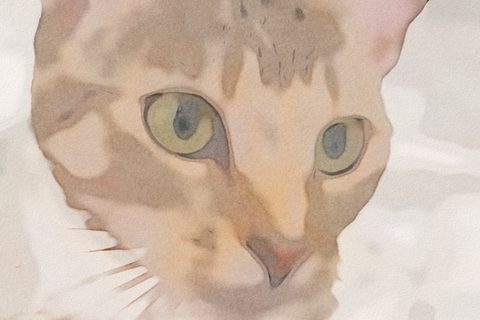
Quick filter is the classic “grayscale, invert, blur, color dodge” effect. It is fast and works everywhere, but it is a basic image filter, not an AI drawing, and it is labeled that way in the tool.
How does the AI sketch engine work?
A real drawing is more than an edge filter. The tool combines AI scene understanding with a renderer that imitates how pencils, paper and hatching behave.
1. AI finds what matters
The U²-Netp salient-object model (running in ONNX Runtime Web) estimates which pixels belong to the main subject, whether that is a person, a pet, a car or a building. MediaPipe Face Mesh places 468 landmarks on each face it finds, including in group photos, so the engine knows where eyes, brows, nose and lips are.
2. The photo is simplified like an artist would
An edge-preserving filter removes noise and tiny texture while keeping contours. On detected skin it smooths more, so pores and blemishes do not turn into pencil marks, while facial features keep fine lines.
3. Pencil outlines follow the edges
A flow-based difference-of-Gaussians traces contours along the direction of each edge, which gives continuous, tapered pencil lines instead of the broken pixel edges a basic filter makes. The subject’s silhouette gets a confident contour.
4. Hatching follows the form
The engine estimates the direction of the image structure at every point and draws strokes along it using line-integral convolution, then layers cross-hatching in darker tones. Strokes catch on a simulated paper tooth, so light pressure only marks the peaks of the grain.
5. Color is laid down in layers
For colored pencil, the pigment for each area is chosen so the stroked layers average out to the photo’s color, while white paper shows through in highlights. Watercolor adds pigment pooling at wash edges and granulation in paper valleys.
What the AI does not do
It does not generate new image content, change faces, or add objects. That is a deliberate choice: generative diffusion models can distort identity and add details, and they are too large for most phones. The trade-off is that the drawing always follows your photo, including its lighting and framing.
Pencil sketch vs. colored-pencil illustration: what is the difference?
A graphite pencil sketch describes form only through value: light and dark. Artists build value with line weight, hatching (parallel strokes), cross-hatching (layers of strokes at different angles) and blending. Graphite has a slight gray-blue sheen and never reaches pure black.
A colored-pencil illustration usually starts with a light graphite drawing, then builds color in thin, translucent layers. Highlights are left as white paper, darks are made by layering several colors rather than using black, and the paper grain shows through in lighter areas. That is why colored-pencil drawings look softer and more luminous than a filtered photo.
Choosing a style for your photo
- Portraits and family photos: Colored pencil or Graphite pencil with Soft fade background.
- Pets: Colored pencil with Detail around 65 to keep fur texture.
- Cars and products: Graphite or Ink pen with stronger outlines.
- Landscapes and buildings: the Landscape preset with Graphite, Ink or Watercolor + pencil.
- Coloring pages and tracing: Line art.
Can you make a video of your sketch being drawn?
Yes. The Animate panel builds a 5, 10, 15 or 30-second clip that starts with blank textured paper, reveals the pencil outlines stroke-group by stroke-group, adds shading, then color, and holds on the finished drawing. MP4 and WebM are encoded with your browser’s WebCodecs video encoder; GIF is encoded in JavaScript. Use it for Reels, TikTok, Shorts or a gift reveal.
The animation is a progressive reveal of the finished artwork. It does not reconstruct the order in which a human artist would draw.
Which file formats and sizes can you download?
| Output | Formats | Size | Best for |
|---|---|---|---|
| Sketch image | PNG, JPG, WebP* | Preview, 1600, 2400 or up to 4096 px | Printing, framing, social posts |
| Drawing animation | MP4*, WebM*, GIF | 1280 or 1920 px long side; GIF at 480 px | Reels, Shorts, messages |
* WebP export, MP4 and WebM depend on your browser’s encoders. The tool only shows options your browser can actually produce.
Print size guide
At 300 dpi, a 2400 px download prints at 8 inches on its long side, and 4096 px prints at about 13.6 inches. For an 8×10 inch print, choose High or Max.
How do you get the most realistic sketch?
- Use a sharp photo with even light. Strong flash shadows become strong pencil shadows.
- Crop close to your subject before uploading; faces should be at least about 150 px wide.
- Raise Detail for fur, hair and fabric, lower it for a looser, more artistic sketch.
- Lower Outline strength for a softer, more painterly drawing.
- Use Vary strokes to redraw the hatching with a different stroke pattern.
- Pick Smooth paper for crisp detail and Watercolor paper for visible grain.
Is it safe to sketch personal photos here?
Your photo is processed on your own device. It is decoded, analysed and drawn by JavaScript and WebAssembly in your browser, and the downloads are created locally. The tool sends no image data anywhere, uses no accounts, and stores nothing except the cached tool and model files your browser keeps to load faster next time.
Key terms in pencil drawing and AI sketching
- Hatching
- Parallel strokes that build tone; closer strokes read as darker.
- Cross-hatching
- A second or third layer of strokes at another angle for deeper shadows.
- Paper tooth
- The tiny hills and valleys of paper that grab pigment and create grain.
- Burnishing
- Pressing colored pencil hard to blend layers into a smooth, waxy finish.
- Salient-object detection
- An AI task that finds the main subject of a photo without knowing its category.
- Face landmarks
- Points an AI model places on eyes, brows, nose, lips and the face outline.
- Edge tangent flow
- A map of the direction of edges and textures, used to orient lines and strokes.
- Line integral convolution
- A technique that smears noise along a direction field, producing stroke-like streaks.
About the AI Photo to Sketch converter
Who made it
Entertainment Couch builds free, private browser tools for photos, GIFs and video. This converter was designed so the drawing stays faithful to the photo and nothing leaves your device.
Known limits
- It draws what is in the photo. It cannot repaint a face, fix closed eyes, remove objects or change the pose.
- Very small faces (under about 60 px) may not be detected; they are still drawn, with normal detail settings.
- Subject detection can merge or miss objects in busy scenes. Use Keep background or the Landscape preset if something important fades.
- Large exports on phones are capped to protect memory. Max size on older devices can take 20–60 seconds.
- The AI guide needs WebAssembly SIMD and module Web Workers. Without them the stroke engine still runs, without AI guidance.
Credits and licenses
- U²-Netp, Xuebin Qin et al., Apache License 2.0 (ONNX export distributed with rembg).
- MediaPipe Face Mesh, Google, Apache License 2.0.
- ONNX Runtime Web, Microsoft, MIT License.
- mp4-muxer and webm-muxer by Vanilagy, MIT License; gifenc by Matt DesLauriers, MIT License.
- Example photo of a cat by Stefan van der Walt, CC0 (via scikit-image).
Full notices: third-party notices.
More free image tools on Entertainment Couch
Edit your photo before sketching, or turn your drawing into something new.
Frequently asked questions
Search, or pick a topic.
General
Is this photo to sketch converter really free?
Yes. It is free with no signup, no subscription, no daily limit and no watermark. Everything runs in your browser, so there are no server costs to pass on to you.
What does the AI actually do here?
Two small open-source models guide the drawing. U²-Netp finds the main subject so the background can fade the way an artist would leave it, and MediaPipe Face Mesh locates eyes, brows, nose and lips so faces keep crisp features and smooth skin. A stroke engine then draws the picture with pencil outlines, hatching, colored-pencil layers and paper texture. The AI steers where detail goes; it does not invent new content.
Is this a generative AI image model like Stable Diffusion?
No. Diffusion models need 1–5 GB downloads and a strong GPU, so they would not run for most visitors, and they can change faces or add details that were not in your photo. This tool uses small vision models plus a deterministic stroke renderer, which keeps your composition and identity intact and works on most phones and laptops.
Is there a free AI sketch generator without signup?
Yes, this one. It is a free AI sketch generator that turns a photo into a sketch without signup, email or payment, and it adds no watermark. Everything runs in your browser.
Do I need to create an account?
No. There is no login, no email and no account. Open the page, add a photo and download your sketch.
Is this a realistic pencil sketch generator or just a filter?
It is more than a filter. A basic filter only finds edges and darkens them. This tool simplifies the photo the way an artist would, draws tapered outlines along the edges, builds tone with hatching and cross-hatching that follow the form, and lets pencil catch on simulated paper grain. The classic filter is still available as Quick filter, clearly labeled.
Using the tool
How do I turn a photo into a drawing on my phone?
Open this page in Safari or Chrome on your phone, tap Choose a photo, pick a picture from your gallery, choose a style and tap Download. Phones use a smaller maximum size (2400–3200 px, depending on the device) to stay within their memory.
How do I turn a photo into a pencil drawing?
Add a photo, pick a style such as Graphite pencil or Colored pencil, adjust the sliders until the preview looks right, then choose Generate HD and download a PNG, JPG or WebP file.
Which sketch styles are available?
Graphite pencil, Colored pencil, Charcoal, Ink pen, Line art, Watercolor with pencil, and a Quick filter. The Quick filter is the classic grayscale color-dodge effect and is labeled as a basic filter, not AI.
What do the sliders change?
Sketch intensity sets overall darkness, Outline strength sets how bold the pencil contours are, Shading controls hatching density and contrast, Paper texture sets how much of the paper grain shows, Color saturation affects colored styles, and Detail chooses between a loose sketch and a highly detailed drawing.
Can I compare the sketch with my original photo?
Yes. Turn on Compare and drag the handle across the image, or use the arrow keys when the handle is focused. You can also zoom in up to 800% and pan to inspect the strokes.
Can I undo changes?
Yes. Undo and redo cover style, slider, paper and background changes. Use the buttons or Ctrl+Z and Ctrl+Shift+Z (Cmd on a Mac).
Results & quality
Will the sketch keep my face and the people in the photo recognizable?
The drawing is built directly from your photo’s edges, tones and colors, so poses, proportions, clothing and objects stay where they are. On portraits, detected facial features get finer lines while skin is shaded smoothly. Very small or heavily blurred faces may be drawn with less detail.
Why does the background look lighter than in my photo?
Artists often leave the background loosely drawn so the subject stands out. With the Background control you can keep the full scene, fade it softly, or leave only the subject on white paper. Landscape mode keeps the whole scene.
What photos work best?
Sharp, well-lit photos with a clear subject work best. Faces should be at least about 150 pixels wide. Very dark, noisy or tiny images give rougher drawings. For landscapes, choose the Landscape subject preset so the scenery is not faded.
Does it work for pets, cars and landscapes?
Yes. The subject detector is not limited to people, so pets, vehicles and objects are found as the main subject. For scenery and architecture use the Landscape preset to keep everything equally detailed.
Drawing animation
Can I make a video of the sketch being drawn?
Yes. In Animate, choose 5, 10, 15 or 30 seconds and MP4, WebM or GIF. The video starts with blank paper, reveals the outlines, then the shading and finally the color, and ends on the finished drawing.
Is the animation a recording of a real artist?
No. It is a progressive reveal of the finished drawing, layer by layer. It shows how the illustration is built up, but it does not reconstruct the stroke order a human artist would use.
Why is MP4 not available in my browser?
MP4 needs the browser to support H.264 encoding through WebCodecs. Chrome, Edge and Safari usually do; some Linux and Firefox builds do not. WebM or GIF is offered whenever MP4 is unavailable.
Files & export
Which formats can I upload?
JPG, PNG, WebP, GIF (first frame), BMP and AVIF. HEIC/HEIF works where your browser can open it, which today mainly means Safari. Files up to 40 MB are accepted.
What resolution can I download?
Preview size, Standard (1600 px long side), High (2400 px) and Max (up to 4096 px on desktop). Very large sizes are drawn at your device’s safe drawing size and finished at full size on fresh paper texture, and the tool tells you when that happens.
Is there a watermark?
No. Downloads contain only your drawing. Nothing is added to the image.
Does the download match the preview?
Yes. All stroke and paper sizes are scaled to the image size, so a large export is the same drawing at higher resolution. Generate HD shows the exact file you will download before you save it.
Privacy
Is my photo uploaded to a server?
No. Decoding, AI analysis, drawing and encoding all happen in your browser. The page downloads the tool and the AI models from Entertainment Couch once, then your photo stays on your device.
Are the AI models stored on my device?
The browser caches the model files (about 4.6 MB for subject detection and about 10 MB for face landmarks plus the runtimes) so the next visit starts faster. You can clear them with your browser’s site data settings.
Technical help
Which browsers and devices are supported?
Current versions of Chrome, Edge, Firefox and Safari on desktop, Android and iPhone/iPad are the target. The AI guide needs WebAssembly with SIMD and module Web Workers; if those are missing, the stroke engine still works without AI guidance and the tool says so.
Why is the first sketch slower than the next ones?
The first render analyses the photo (flow field, outlines and stroke maps) and may download the AI models. After that, slider changes reuse the analysis and update much faster.
The tool ran out of memory. What can I do?
Choose a smaller download size, close other tabs, or use a computer for Max size exports. Phones get a lower size cap automatically.
No questions match that search.